Pages

Monday, October 26, 2009

Microprocessors

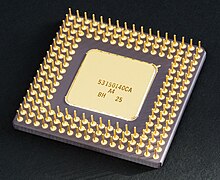
The introduction of the microprocessor in the 1970s significantly affected the design and implementation of CPUs. Since the introduction of the first commercially available microprocessor (the Intel 4004) in 1970 and the first widely used microprocessor (the Intel 8080) in 1974, this class of CPUs has almost completely overtaken all other central processing unit implementation methods. Mainframe and minicomputer manufacturers of the time launched proprietary IC development programs to upgrade their older computer architectures, and eventually produced instruction set compatible microprocessors that were backward-compatible with their older hardware and software. Combined with the advent and eventual vast success of the now ubiquitous personal computer, the term "CPU" is now applied almost exclusively to microprocessors.

Previous generations of CPUs were implemented as discrete components and numerous small integrated circuits (ICs) on one or more circuit boards. Microprocessors, on the other hand, are CPUs manufactured on a very small number of ICs; usually just one. The overall smaller CPU size as a result of being implemented on a single die means faster switching time because of physical factors like decreased gate parasitic capacitance. This has allowed synchronous microprocessors to have clock rates ranging from tens of megahertz to several gigahertz. Additionally, as the ability to construct exceedingly small transistors on an IC has increased, the complexity and number of transistors in a single CPU has increased dramatically. This widely observed trend is described by Moore's law, which has proven to be a fairly accurate predictor of the growth of CPU (and other IC) complexity to date.

While the complexity, size, construction, and general form of CPUs have changed drastically over the past sixty years, it is notable that the basic design and function has not changed much at all. Almost all common CPUs today can be very accurately described as von Neumann stored-program machines. As the aforementioned Moore's law continues to hold true, concerns have arisen about the limits of integrated circuit transistor technology. Extreme miniaturization of electronic gates is causing the effects of phenomena like electromigration and subthreshold leakage to become much more significant. These newer concerns are among the many factors causing researchers to investigate new methods of computing such as the quantum computer, as well as to expand the usage of parallelism and other methods that extend the usefulness of the classical von Neumann model.

Friday, October 16, 2009

Computer Network

A computer network, often simply referred to as a network, is a collection of computers and devices interconnected by communications channels that facilitate communications among users and allows users to share resources. Networks may be classified according to a wide variety of characteristics.

Introduction
A computer network allows sharing of resources and information among interconnected devices. In the 1960s, the Advanced Research Projects Agency (ARPA) started funding the design of the Advanced Research Projects Agency Network (ARPANET) for the United States Department of Defense. It was the first computer network in the world. Development of the network began in 1969, based on designs developed during the 1960s.

Purpose
Computer networks can be used for a variety of purposes:

  • Facilitating communications. Using a network, people can communicate efficiently and easily via email, instant messaging, chat rooms, telephone, video telephone calls, and video conferencing.
  • Sharing hardware. In a networked environment, each computer on a network may access and use hardware resources on the network, such as printing a document on a shared network printer.
  • Sharing files, data, and information. In a network environment, authorized user may access data and information stored on other computers on the network. The capability of providing access to data and information on shared storage devices is an important feature of many networks.
  • Sharing software. Users connected to a network may run application programs on remote computers.
  • Information preservation.
  • Security.
  • Speed up.


Network Classification
The following list presents categories used for classifying networks.

Connection method
Computer networks can be classified according to the hardware and software technology that is used to interconnect the individual devices in the network, such as optical fiber, Ethernet, wireless LAN, HomePNA, power line communication or G.hn.
Ethernet as it is defined by IEEE 802 utilizes various standards and mediums that enable communication between devices. Frequently deployed devices include hubs, switches, bridges, or routers. Wireless LAN technology is designed to connect devices without wiring. These devices use radio waves or infrared signals as a transmission medium. ITU-T G.hn technology uses existing home wiring (coaxial cable, phone lines and power lines) to create a high-speed (up to 1 Gigabit/s) local area network.

Wired technologies
Twisted pair wire is the most widely used medium for telecommunication. Twisted-pair cabling consist of copper wires that are twisted into pairs. Ordinary telephone wires consist of two insulated copper wires twisted into pairs. Computer networking cabling consist of 4 pairs of copper cabling that can be utilized for both voice and data transmission. The use of two wires twisted together helps to reduce crosstalk and electromagnetic induction. The transmission speed ranges from 2 million bits per second to 100 million bits per second. Twisted pair cabling comes in two forms which are Unshielded Twisted Pair (UTP) and Shielded twisted-pair (STP) which are rated in categories which are manufactured in different increments for various scenarios.
Coaxial cable is widely used for cable television systems, office buildings, and other worksites for local area networks. The cables consist of copper or aluminum wire wrapped with insulating layer typically of a flexible material with a high dielectric constant, all of which are surrounded by a conductive layer. The layers of insulation help minimize interference and distortion. Transmission speed range from 200 million to more than 500 million bits per second.
Optical fiber cable consists of one or more filaments of glass fiber wrapped in protective layers. It transmits light which can travel over extended distances. Fiber-optic cables are not affected by electromagnetic radiation. Transmission speed may reach trillions of bits per second. The transmission speed of fiber optics is hundreds of times faster than for coaxial cables and thousands of times faster than a twisted-pair wire.

Wireless technologies
Terrestrial microwave – Terrestrial microwaves use Earth-based transmitter and receiver. The equipment look similar to satellite dishes. Terrestrial microwaves use low-gigahertz range, which limits all communications to line-of-sight. Path between relay stations spaced approx, 30 miles apart. Microwave antennas are usually placed on top of buildings, towers, hills, and mountain peaks.
Communications satellites – The satellites use microwave radio as their telecommunications medium which are not deflected by the Earth's atmosphere. The satellites are stationed in space, typically 22,000 miles (for geosynchronous satellites) above the equator. These Earth-orbiting systems are capable of receiving and relaying voice, data, and TV signals.
Cellular and PCS systems – Use several radio communications technologies. The systems are divided to different geographic areas. Each area has a low-power transmitter or radio relay antenna device to relay calls from one area to the next area.
Wireless LANs – Wireless local area network use a high-frequency radio technology similar to digital cellular and a low-frequency radio technology. Wireless LANs use spread spectrum technology to enable communication between multiple devices in a limited area. An example of open-standards wireless radio-wave technology is IEEE.
Infrared communication , which can transmit signals between devices within small distances not more than 10 meters peer to peer or ( face to face ) without any body in the line of transmitting.

Scale
Networks are often classified as local area network (LAN), wide area network (WAN), metropolitan area network (MAN), personal area network (PAN), virtual private network (VPN), campus area network (CAN), storage area network (SAN), and others, depending on their scale, scope and purpose, e.g., controller area network (CAN) usage, trust level, and access right often differ between these types of networks. LANs tend to be designed for internal use by an organization's internal systems and employees in individual physical locations, such as a building, while WANs may connect physically separate parts of an organization and may include connections to third parties.

Functional relationship (network architecture)
Computer networks may be classified according to the functional relationships which exist among the elements of the network, e.g., active networking, client–server and peer-to-peer (workgroup) architecture.

Network topology
Computer networks may be classified according to the network topology upon which the network is based, such as bus network, star network, ring network, mesh network. Network topology is the coordination by which devices in the network are arranged in their logical relations to one another, independent of physical arrangement. Even if networked computers are physically placed in a linear arrangement and are connected to a hub, the network has a star topology, rather than a bus topology. In this regard the visual and operational characteristics of a network are distinct. Networks may be classified based on the method of data used to convey the data, these include digital and analog networks.

Tuesday, October 13, 2009

Central Processing Unit

The central processing unit (CPU) is the portion of a computer system that carries out the instructions of a computer program, and is the primary element carrying out the computer's functions. The central processing unit carries out each instruction of the program in sequence, to perform the basic arithmetical, logical, and input/output operations of the system. This term has been in use in the computer industry at least since the early 1960s. The form, design and implementation of CPUs have changed dramatically since the earliest examples, but their fundamental operation remains much the same.
Early CPUs were custom-designed as a part of a larger, sometimes one-of-a-kind, computer. However, this costly method of designing custom CPUs for a particular application has largely given way to the development of mass-produced processors that are made for one or many purposes. This standardization trend generally began in the era of discrete transistor mainframes and minicomputers and has rapidly accelerated with the popularization of the integrated circuit (IC). The IC has allowed increasingly complex CPUs to be designed and manufactured to tolerances on the order of nanometers. Both the miniaturization and standardization of CPUs have increased the presence of these digital devices in modern life far beyond the limited application of dedicated computing machines. Modern microprocessors appear in everything from automobiles to cell phones and children's toys.

History
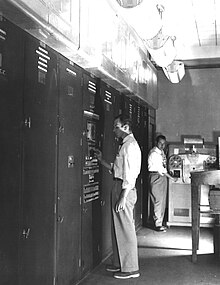
EDVAC, one of the first electronic stored program computers.

Computers such as the ENIAC had to be physically rewired in order to perform different tasks, which caused these machines to be called "fixed-program computers." Since the term "CPU" is generally defined as a software (computer program) execution device, the earliest devices that could rightly be called CPUs came with the advent of the stored-program computer.
The idea of a stored-program computer was already present in the design of J. Presper Eckert and John William Mauchly's ENIAC, but was initially omitted so the machine could be finished sooner. On June 30, 1945, before ENIAC was even completed, mathematician John von Neumann distributed the paper entitled First Draft of a Report on the EDVAC. It outlined the design of a stored-program computer that would eventually be completed in August 1949. EDVAC was designed to perform a certain number of instructions (or operations) of various types. These instructions could be combined to create useful programs for the EDVAC to run. Significantly, the programs written for EDVAC were stored in high-speed computer memory rather than specified by the physical wiring of the computer. This overcame a severe limitation of ENIAC, which was the considerable time and effort required to reconfigure the computer to perform a new task. With von Neumann's design, the program, or software, that EDVAC ran could be changed simply by changing the contents of the computer's memory.
While von Neumann is most often credited with the design of the stored-program computer because of his design of EDVAC, others before him, such as Konrad Zuse, had suggested and implemented similar ideas. The so-called Harvard architecture of the Harvard Mark I, which was completed before EDVAC, also utilized a stored-program design using punched paper tape rather than electronic memory. The key difference between the von Neumann and Harvard architectures is that the latter separates the storage and treatment of CPU instructions and data, while the former uses the same memory space for both. Most modern CPUs are primarily von Neumann in design, but elements of the Harvard architecture are commonly seen as well.
As a digital device, a CPU is limited to a set of discrete states, and requires some kind of switching elements to differentiate between and change states. Prior to commercial development of the transistor, electrical relays and vacuum tubes (thermionic valves) were commonly used as switching elements. Although these had distinct speed advantages over earlier, purely mechanical designs, they were unreliable for various reasons. For example, building direct current sequential logic circuits out of relays requires additional hardware to cope with the problem of contact bounce. While vacuum tubes do not suffer from contact bounce, they must heat up before becoming fully operational, and they eventually cease to function due to slow contamination of their cathodes that occurs in the course of normal operation. If a tube's vacuum seal leaks, as sometimes happens, cathode contamination is accelerated. Usually, when a tube failed, the CPU would have to be diagnosed to locate the failed component so it could be replaced. Therefore, early electronic (vacuum tube based) computers were generally faster but less reliable than electromechanical (relay based) computers.
Tube computers like EDVAC tended to average eight hours between failures, whereas relay computers like the (slower, but earlier) Harvard Mark I failed very rarely. In the end, tube based CPUs became dominant because the significant speed advantages afforded generally outweighed the reliability problems. Most of these early synchronous CPUs ran at low clock rates compared to modern microelectronic designs (see below for a discussion of clock rate). Clock signal frequencies ranging from 100 kHz to 4 MHz were very common at this time, limited largely by the speed of the switching devices they were built with.

Operation
The fundamental operation of most CPUs, regardless of the physical form they take, is to execute a sequence of stored instructions called a program. The program is represented by a series of numbers that are kept in some kind of computer memory. There are four steps that nearly all CPUs use in their operation: fetch, decode, execute, and writeback.
The first step, fetch, involves retrieving an instruction (which is represented by a number or sequence of numbers) from program memory. The location in program memory is determined by a program counter (PC), which stores a number that identifies the current position in the program. In other words, the program counter keeps track of the CPU's place in the program. After an instruction is fetched, the PC is incremented by the length of the instruction word in terms of memory units. Often the instruction to be fetched must be retrieved from relatively slow memory, causing the CPU to stall while waiting for the instruction to be returned. This issue is largely addressed in modern processors by caches and pipeline architectures (see below).
The instruction that the CPU fetches from memory is used to determine what the CPU is to do. In the decode step, the instruction is broken up into parts that have significance to other portions of the CPU. The way in which the numerical instruction value is interpreted is defined by the CPU's instruction set architecture (ISA). Often, one group of numbers in the instruction, called the opcode, indicates which operation to perform. The remaining parts of the number usually provide information required for that instruction, such as operands for an addition operation. Such operands may be given as a constant value (called an immediate value), or as a place to locate a value: a register or a memory address, as determined by some addressing mode. In older designs the portions of the CPU responsible for instruction decoding were unchangeable hardware devices. However, in more abstract and complicated CPUs and ISAs, a microprogram is often used to assist in translating instructions into various configuration signals for the CPU. This microprogram is sometimes rewritable so that it can be modified to change the way the CPU decodes instructions even after it has been manufactured.
After the fetch and decode steps, the execute step is performed. During this step, various portions of the CPU are connected so they can perform the desired operation. If, for instance, an addition operation was requested, an arithmetic logic unit (ALU) will be connected to a set of inputs and a set of outputs. The inputs provide the numbers to be added, and the outputs will contain the final sum. The ALU contains the circuitry to perform simple arithmetic and logical operations on the inputs (like addition and bitwise operations). If the addition operation produces a result too large for the CPU to handle, an arithmetic overflow flag in a flags register may also be set.
The final step, writeback, simply "writes back" the results of the execute step to some form of memory. Very often the results are written to some internal CPU register for quick access by subsequent instructions. In other cases results may be written to slower, but cheaper and larger, main memory. Some types of instructions manipulate the program counter rather than directly produce result data. These are generally called "jumps" and facilitate behavior like loops, conditional program execution (through the use of a conditional jump), and functions in programs. Many instructions will also change the state of digits in a "flags" register. These flags can be used to influence how a program behaves, since they often indicate the outcome of various operations. For example, one type of "compare" instruction considers two values and sets a number in the flags register according to which one is greater. This flag could then be used by a later jump instruction to determine program flow.
After the execution of the instruction and writeback of the resulting data, the entire process repeats, with the next instruction cycle normally fetching the next-in-sequence instruction because of the incremented value in the program counter. If the completed instruction was a jump, the program counter will be modified to contain the address of the instruction that was jumped to, and program execution continues normally. In more complex CPUs than the one described here, multiple instructions can be fetched, decoded, and executed simultaneously. This section describes what is generally referred to as the "Classic RISC pipeline", which in fact is quite common among the simple CPUs used in many electronic devices (often called microcontroller). It largely ignores the important role of CPU cache, and therefore the access stage of the pipeline.
Wednesday, October 7, 2009

Video Graphics Array

Video Graphics Array (VGA) refers specifically to the display hardware first introduced with the IBM PS/2 line of computers in 1987, but through its widespread adoption has also come to mean either an analog computer display standard, the 15-pin D-subminiature VGA connector or the 640×480 resolution itself. While this resolution was superseded in the personal computer market in the 1990s, it is becoming a popular resolution on mobile devices.
VGA was the last graphical standard introduced by IBM that the majority of PC clone manufacturers conformed to, making it today (as of 2010) the lowest common denominator that all PC graphics hardware can be expected to implement without device-specific driver software. For example, the Microsoft Windows splash screen appears while the machine is still operating in VGA mode, which is the reason that this screen always appears in reduced resolution and color depth.
VGA was officially superseded by IBM's Extended Graphics Array (XGA) standard, but in reality it was superseded by numerous slightly different extensions to VGA made by clone manufacturers that came to be known collectively as Super VGA.

Hardware
VGA compared to other standard resolutions.

VGA is referred to as an "array" instead of an "adapter" because it was implemented from the start as a single chip (an ASIC), replacing the Motorola 6845 and dozens of discrete logic chips that covered the full-length ISA boards of the MDA, CGA, and EGA. Its single-chip implementation also allowed the VGA to be placed directly on a PC's motherboard with a minimum of difficulty (it only required video memory, timing crystals and an external RAMDAC), and the first IBM PS/2 models were equipped with VGA on the motherboard. (Contrast this with all of the "family one" IBM PC desktop models—the PC [machine-type 5150], PC/XT [5160], and PC AT [5170]—which required a display adapter installed in a slot in order to connect a monitor.)
The VGA specifications are as follows:

  • 256 KB Video RAM (The very first cards could be ordered with 64 KB or 128 KB of RAM at the cost of losing some video modes).
  • 16-color and 256-color modes
  • 262,144-value color palette (six bits each for red, green, and blue)
  • Selectable 25.175 MHz or 28.322 MHz master clock
  • Maximum of 800 horizontal pixels
  • Maximum of 600 lines
  • Refresh rates at up to 70 Hz
  • Vertical blank interrupt (Not all clone cards support this.)
  • Planar mode: up to 16 colors (4 bit planes)
  • Packed-pixel mode: 256 colors (Mode 13h)
  • Hardware smooth scrolling support
  • Some "Raster Ops" support
  • Barrel shifter
  • Split screen support
  • 0.7 V peak-to-peak
  • 75 ohm double-terminated impedance (18.7 mA – 13 mW)

The VGA supports both All Points Addressable graphics modes, and alphanumeric text modes. Standard graphics modes are:

  • 640×480 in 16 colors
  • 640×350 in 16 colors
  • 320×200 in 16 colors
  • 320×200 in 256 colors (Mode 13h)

As well as the standard modes, VGA can be configured to emulate many of the modes of its predecessors (EGA, CGA, and MDA). Compatibility is almost full at BIOS level, but even at register level, a very high value of compatibility is reached. VGA is not compatible with the special IBM PCjr or HGC video modes.